top of page

Optimize Smart Streetlight Control Experience - Part 1


Digitalizing Sunstay Solar luminaires with an existing app ‘Service Tag’ and allow SunStay users to have:
-
Secure device connection
-
A seamless experience for lighting configuration and monitoring (Click on me to view part 2)
Background


Service Tag is an existing app that supports hundreds of NFC-based smart streetlights from Signify (formerly known as Philips Lighting).
SunStay is the FIRST Bluetooth-based streetlight integrated into Service Tag and is CHALLENGING for its unique requirements and technique limitations.
I executed the design and coordinated with two product teams to create optimized experiences for connecting, configuring, and monitoring SunStay smart streetlight.
My Responsibilities
-
Led design workstream including research, wireframing, prototyping, testing, etc.
-
In charge of design coordination between 2 product teams
-
Collaborated with both hardware and software teams.
-
Key contributor to business stakeholder coordination to get buy-in

Approach

DISCOVER
Engaged Various Stakeholders To Fill Knowledge Gap
In order to build a better understand of the SunStay products, I kicked off the discovery phase by setting up expert interviews with the Sunstay internal teams, and then continued with user interviews. At the same time, I also led the efforts to collect market inputs because they experiennced with wider user diversity and thus shared deeper perspective and higher vision.
Led 3 expert interviews, 4 markets interviews & 5 user interviews

Created a Centralized Knowledge Repository
To Connect 2 Siloed Product Teams
As I communicated with the Service Tag team, I observed there were a lot of repetitive communications across the different teams. To save back-and-forth communication, I invested time into organizing documents on research to improve information transmission across teams.

DEFINE
So Many Inputs? Categorize & Prioritize
One of the biggest challenges was balancing moving forward with designs while connecting / debating with other teams for pending decisions. It was like everyone was waiting on something and they all looked for a finalized decision.
Scored Options On An Effort/Impact Scale
Thus, I started to work with PM to prioritize and categorize inputs with various methods like card sorting, reviewing use cases, defining user journeys to help prioritize the core features and drive the decision-making process.

Problem Statements
We evaluated all requests and balanced values for users with the efforts of the development to finalize the product requirements.
In summary, how can we help users:
-
To connect the luminaires with mobile devices with a Secure & Simple flow?
-
To configure and monitor the light even without having too much knowledge on SunStay products? (This will be discussed in Part 2, click on me to view)
THE KEY CHALLENGE
Having Service Connection With BLE
Maintains A Critical Security Flaw

During installation
-
Get 2 QR codes from the box
-
Place one on the head, the other on the pole

Whenever need connection
(All other products)
-
Other products use NFC, so users have to climb up to scan code on head
-
Height is the “security factor”

Here’s comes the problem
Whenever need connection
(SunStay Products)
-
SunStay uses a Bluetooth connection so that users can connect on ground level.
-
Also means everyone can access
FIRST ATTEMPT
What If We Create One PW Per Order
Concept Flow


AND Why Is It NOT gonna work?
To make this idea work, we have to make sure every single light we sell to the customers is somehow customized in order to keep the same password for an entire order/ a project. It asks a lot from the hardware team to work on the charge controller. Also, this idea is hard to scale for a long-term value (ex: what if in the future SunStay products are sold by the warehouses? ) Thus, we decided to not investigate into this concept.
SECOND TRY
What If To Let Users Create Password?
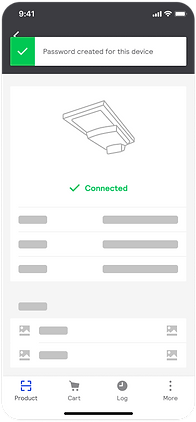
Evolving from the first idea, I started to think if we couldn’t create password for the users, what if we let the users to create for themselves? The first installer who connects with the luminaire during installation could create a P.W. to claim the light and then share that P.W across the team for later connections.
Concept Flow




AND Why Is It NOT gonna work?
This idea may exist in an ideal case as it’s dependent on various conditions to make it work. For example, the ideal case would have multiple installers working on the same project, and they all “claim” lights with the same P.W. However, what if one of them creates a wrong P.W. without even notice? Then it will become a problem for later connections. There’re so many lights and so many crew members involved in a project, it’s going to be very error-prone.
BACK TO THE DRAWING BOARD
Inspirations From The Past
The password approaches didn’t work, so I went back to my drawing board and started to reimagine the journey for the users. I also reached out to my dear colleagues. By analyzing the pros and cons of my concepts with them, a new idea evolved in my mind.
Why not let the installer manager creates projects and share project access with the crew?

Concept Flow

AND Why Did This Idea Work?
With this concept, no P.W. logic is involved. This will reduce a lot of typing work from the users. And it’s even more secure this way because P.W can be leaked but project accesses can only be managed by the admin (installer manager) It’s more manageable and more convenient to the users.
DESIGN
MVP First
Manager flow - Create Project and invite users


Crew’s flow - Register light under project and connect


AFTER USER FEEDBACK
How Can I Iterate For Even fewer Works
& Better Error Protection
When presenting the first-round design to the markets and users, although feedbacks were positive, users developed concerns regarding repetitive actions. What if the installers work for multiple projects? What if they make a mistake and they didn’t realize it?
To simplify the flow even more, I could simply make it auto-select last used project, but it didn’t solve users’ concern regarding making errors.
Solution 1: take advantage of the existing location feature in Service Tag
After reviewing the current features of Service Tag, I realized that I could leverage the GPS of the lights for validation of the project registration as all lights in the same project will only be installed adjacent to each other.


SHOOT FOR NORTH STAR
And I Didn’t Stop There
Since the concern was raised by the installer manager but not the installers, I realized solution 1 which focuses mainly on the crew members is not enough, so I really investigated into the location concept and explored other ideas based on solution 1.
Solution 2: Double - Check By The Managers
By giving a view of the registered lights on map, the manager can easily spot any light that look off and give it a quick fix. This allows the manager to have bird-view of the project and thus makes the project more manageable.


Outcome

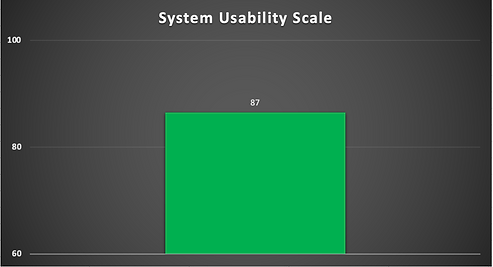
Success measurement based on SUS & NPS


bottom of page