
Signify
(Formerly Philips Lighting)
Reimagine The Calendar For Lighting Engineers
Lighting Shows Require Massive Maintenance
TIMELINE
3 WEEKS
MY ROLE
Signify (formerly known as Philips Lighting) never cease to amaze people with its mind-blowing lighting shows which inevitably involve tons of lighting workers’ contributions on device spectating and events planning.
Project Lead
User Interview
Usability Test
Design Execution
Presentation & Design Handover

During my internship, I led a project on redesigning the existing Calendar and transformed it into an intuitive tool allowing for complex and massive event planning.

USER JOURNEY

Maintaining lighting shows is a complex task as our users (internal lighting works) have to manage hundreds of events each month. Each individual show involves complex tasks including but not limited to devise scanning, reporting, lighting show managing, etc.
PROBLEMS
Existing Calendar Is Not Capable For Complex And Massive Event Planning
Unfortunately, the existing calendar although fulfilled the fundamental needs, still had a lot of room for improvement in terms of user experiences.
Calendar Monthly View (Before)


• It lacks features such as facilitating the users to locate their events of interest at a quick glance.

• It requires accessibility optimization in a monthly view.

• It needs improvements to allow users to schedule events efficiently and smartly.
CHALLENGES
• Big Feature Changes Will Result In Longer Learning Curve
The first paradox I had to face: our users had adapted the existing design so well, and thus didn’t expect dramatic changes.

• How Can We Display Complex & Massive Contents Into A Limited Space
The Calendar is embedded within a complex Device Monitor App so there was not much space left for me to work with.
• What Are The Low-Effort But High Impact Solutions We Can Release?
Since we have a super intact and thorough design system, in terms of visuals, I have to always keep consistency in mind.
HOW WE GOT THERE
Our aim was to achieve a relatively high impact with a minimum amount of changes and efforts. Since our users often use this product outside and under various weather conditions, the prioritized problems we targeted during the first attempt were low legibility and event labeling & filtering.

Clean Up And Sort Out Events
First Attemtps

Based on user needs, the events were categorized into three types, and each was assigned with a color indication.
Addition of a filter feature to help the users locate the events of interest efficiently.
WHY NOT WORKING?
We Solved The Existing Problem But More Problems Surfaced
Before

Users:
• "I usually have 4 - 5 daily events, so for most cases, I could view them all, but the font size is too small."
• "Each event was highlighted so it separated nicely, but the color hurts my eyes and no differentiation among event types."
After
Users:
• I can view 3 events now but have to click to view more.
• The color indications help sort events but the texts felt clumped together.
• What if I have more needs to sort my events?

BACK TO THE DRAWING BOARD
Rethink About The Targeted Problems
So I decided to go back to the drawing board and redetermined the question: what are the minimum changes we can make to let the users still have the pros of the previous Calendar but reduce the cons of it?
• How do I help users sort events with labels in an intuitive way?
• How do I use the colors smartly to mark the event but not overwhelm the users?
• How do I increase the font size but allow the users to preview more events in the limited date cell space?

TAKE 2
Utilize Users' Sensitivity To Colors
Our users are lighting workers and thus are very sensitive to colors. When they see colors, they inevitably connect to certain themes and meanings.
What a user naturally think when seeing this:
Lighting shows
Expected
event labels

Pinky City Night
Cool Tone Illunimation
Sunset Time Show
Allow The Users To Customize Labels Intuitively

I extracted the color set from our lighting system to allow the users to label their events by their choice so that each color has a meaning and has a closer connection to the event.
Make The Important Events Pop Up
Investigate Into Different Types of Events:

Routine events: Lower Hierarchy
Lighting Show & Scenes: Higher Hierarchy
Only Highlight What's Important

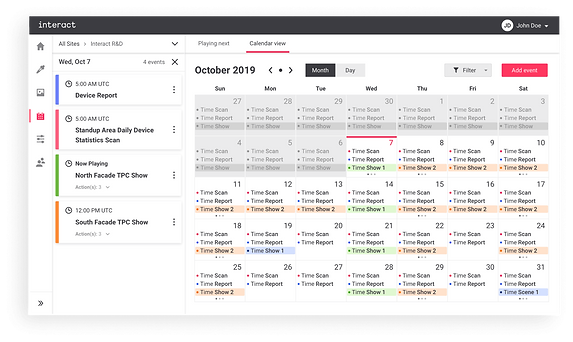
The labels helped with segregating the events, but we didn't want to overwhelm the users with colors. Thus, I came up with a solution that gave users the freedom to turn off the background highlight on the event labels. By turning off the background highlight on less important events, those that are more highlighted would stand out even more.
No Room?
Make Some Then
With accessibility in mind, I couldn’t fit 4 events into one single date cell.
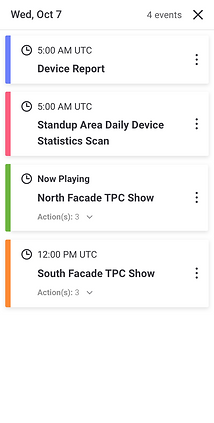
When there’s no space, I went ahead and created some. When the users are on Calendar, the navigation panel for devices is actually not in use anymore.
Thus, I came up with a solution to use the navigation panel as a shared space for full-day events.
WE DIDN'T STOP THERE
How Can We Build A Even Better Product To A Perfect?
We're always thinking about how we can improve the product not only for the users’ experiences but also for the quality of our lighting shows. We want to make sure the lighting shows are scheduled and played exactly at the perfect time.
The existing design allowed the users to set up recurring events that happen at the fixed time only (ex: 7 PM every day), but there is one situation in which the users need to set up a recurring event at different times every day. The sunset shows had been scheduled individually on each day, and the users have to figure out the time themselves. It involves extra works, and risks of inaccuracy. We need to rethink the event scheduling flow.
May It Be A Light To You In Dark Places
The light shows shine into people’s night lives. It is delightful and romantic to see the city lit up when the sun goes down. Thus, making sure the lights are on time is crucial.

However, as we all know, sunset times change each day, so the users have to set up recurring sunset events on each day.
To solve the problem, I confirmed with the PM and back-end engineers, and together we decided to insert a section in the event scheduling flow to allow users to set up recurring events at sunset efficiently.
Running Forward
&
Looking Back

— Voice Out
— Pushing The Envelope
— Be Brave To Ask Questions
It was quite exciting to witness design work getting validated. I had an amazing experience interning as a UX designer at Signify.
My internship was filled with lots of firsts:
It was the first time I worked with people remotely from various time zones.
It was the first time I worked in an agile process.
It was the first time I was challenged to design a B2B product that I got loaded with a wide range of domain knowledge.
etc.
Having this great opportunity allowed me to explore my full potentials, met a great number of talented people from whom I learned greatly, and give and receive valuable feedback from not only designers but also other product stakeholders such as the product manager and the developers. Through this experience, I've grown quickly and become a much more confident designer.
WHAT DID I DO?
Schedule Events Time Smartly
After discussing with the PM and back-end engineers, we determined that we can help the users calculate the everyday sunset time at back. We received a great number of positive feedbacks from the users during the usability test on this new feature. Small changes can make a big impact!
